
What the Radar is for, and its limits
The Radar is a ranked long list of UK organisations that have premises worth guarding, built to find and qualify buyers of manned guarding. It selects companies from the Companies House register on their registered activity, sorts them into six routes (end users with premises of their own, construction site operators, facilities contractors, managing agents, landlords and public bodies), keeps those big enough to matter and puts them in order using measures read from each company's own filed accounts: premises (how much of the balance sheet is plant and property), growth (headcount or net assets, compounded) and signal (how the latest year compares with the company's own past). Public bodies are ranked on how actively they buy guarding on the public notice platforms instead. A model-run check of each company's website, a short written summary and the list of active directors sit beside the rank to help a reader judge it, and a second page shows the public-sector market for guarding: contracts ending soon, open notices, who wins and who buys. The Radar shows where an organisation sits against the others on what its accounts and notices say; it does not prove that it is a good prospect. Most small companies file accounts without turnover and the order discards distance: a company is not measurably "worse" than the one just above it. Treat the list as a well-sorted starting point for human review.
The numbers today
All figures are from the published dataset of 6 November 2026 unless another date is given. Each line ends, in italics, with what it means for you.
- 1,353,897 companies were selected from the register into the long list, and 1,304,825 of them could be scored from their own accounts; 294 public bodies joined them from the notice platforms. The starting population is wide on purpose; the routes and the ranking do the narrowing.
- 18,438 organisations are published in ranked order: 15,695 end users, 1,994 site operators, 346 intermediaries, 294 public bodies, 62 landlords and 47 managing agents. This is the list you work from.
- 14,159 came in on three years of accounts and fifty staff (profile "established"); 3,592 on plant and property (2,461 "low headcount", 1,131 "emerging"); 393 on headcount alone (profile "headcount": the intermediaries and managing agents); 294 on their tender notices (the public bodies). Each route has its own way in (section 3.3).
- 13,578 organisations have three measures scored, 3,467 two and 1,393 one, the 294 public bodies among them; site operators, intermediaries and managing agents have two measures at most and a public body one. A company with fewer measures than its route allows is ranked on less evidence; the Measures column shows which.
- 12,992 organisations are in the high confidence band (70%), 3,963 medium (21%) and 1,483 low (8%). Confidence never changes the order; use it as a filter.
- 12,359 organisations show a Web check verdict, 158 of them through a subsidiary's website: 7,374 In scope, 1,539 Adjacent, 832 Out and 2,614 No presence; 6,079 are Unchecked. The list opens on everything; Web check: In scope is one click away.
- 18,144 companies have a current model-written summary, 15,210 of them drafted by the local model and 2,934 by Anthropic's Claude; none is marked as drafted before the figures last moved; the 294 public bodies have a rule-written one. A summary's numbers come from the organisation's own figures: by construction for rule-written text and by a check for model-written text.
- 18,159 organisations have at least one active director listed from the officers register. Directors are a lead for contact research, not a live record.
- 3,239 public notices for guarding in the UK, from 941 buyers, are on the Tenders page: 181 contracts end within 24 months and 40 notices are open; 1,104 suppliers have won the work, 216 of them on the SIA's Register of Approved Contractors. A further 319 notices for British posts abroad were read and left out (section 7). These are the Tenders page's views (section 7), counted on the export day: the page leaves out each contract that has ended and each notice that has closed since, so its tiles read lower as the weeks pass.
How the list is built
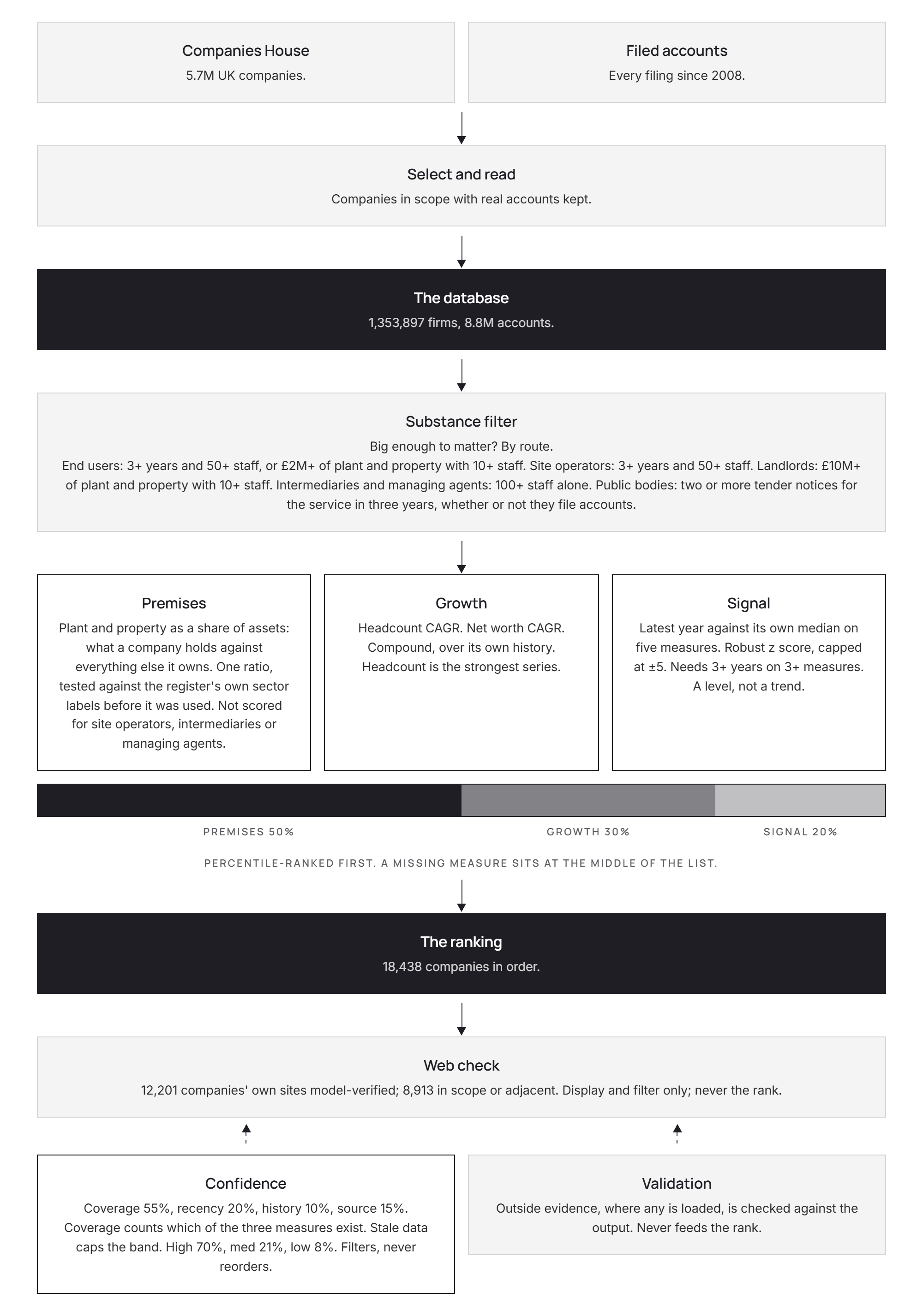
The page draws the steps of this section as a flow on the white sheet below the ranked list (Figure 1); the subsections take them in turn.
3.1Selection from the register
The long list is chosen from register facts alone.
- The company must be active on the register and must not file dormant accounts or have no accounts filed.
- At least one of its activity (SIC) codes must fall in the sectors that buy guarding or run premises that need it: retail; warehousing and storage; construction; letting and operating property (landlords); property management; facilities management (combined facilities support, general cleaning and other cleaning of buildings); hotels; car parks and land transport services; health and residential care; education; and manufacturing.
- A company carrying the code for private security activities is out, whatever else it carries: those are competitors, not buyers.
- The drawer's "Selected because" line names the sector that let a company in.
Why it mattersThe selection is wide so that the routes and the ranking can do the work.
3.2The accounts behind it
- Every set of accounts the selected companies have filed electronically since 2008 is read: 8,838,208 sets, shown on the page as "8.8M accounts", all of them tagged data (iXBRL) that a machine reads exactly.
- No group (consolidated) accounts are among this list's figures. Were any to appear, they would be kept as evidence, labelled "consolidated" in the drawer and never scored, since they describe a whole family of companies.
- A year filed in another currency is shown as filed, never converted and left out of every money measure; its headcount still counts.
- Audited repair passes run before scoring to correct filings that put the £'000 scale on headcount or money figures, or that read a headcount of nought on a company with real substance.
Why it mattersEvery score rests on these figures, so where each one came from is kept and shown in the drawer.
3.3Routes and gates
Each organisation takes the first route whose rule it meets, in this order, and each route has its own gate:
| Route | Who | Gate | Scored on premises |
|---|---|---|---|
| Public body | a buyer of guarding with two or more notices for work in the UK on Find a Tender or Contracts Finder in the last three years, whether or not it files accounts | its notices (section 3.7) | no: ranked on tender activity |
| Intermediary | a facilities contractor (combined facilities support or general cleaning anywhere in its codes), whose premises are its clients' | 100 staff | no |
| Site operator | a construction contractor (any construction code), whose premises are its sites | three years of accounts and 50 staff | no |
| Managing agent | a company whose every code is in real estate, with at least one for managing property on a fee basis, so its premises are the buildings it runs for others | 100 staff | no |
| Landlord | a company whose every code is in buying, selling or letting property or in estate agency | £10M of plant and property, with at least 10 staff | yes |
| End user | everyone else: premises of its own | three years of accounts and 50 staff, or £2M of plant and property at any age with at least 10 staff | yes |
- The profile column says how a company came in: established (three years and the route's staff bar), emerging (in on plant and property, under three years old), low headcount (in on plant and property, three years or more but under the staff bar), headcount (in on staff alone) or public body.
- The plant and property figure may come from an older period, but no more than two years before the company's latest filed period. Where the gate read anything other than the latest period, the drawer says so ("Capital limb read").
- A company with an operating code anywhere in its list operates: a construction company that also manages property is a site operator, and a care home with a letting code is an end user.
Why it mattersThe gate decides who is in; it adds nothing to the score. Getting in says an organisation is big enough to matter, nothing more.
3.4The three measures
Premises: plant and property against everything else. The share of the balance sheet held as plant and property (tangible fixed assets), against everything else the company owns. A hotel, a warehouse, a car park or a care home holds most of its assets as premises; a contractor or a consultancy holds very little. It is one ratio, so it is missing only where the accounts carry no figure for it at all.
- How well it separates. Before it was used, it was tested on companies the register itself classes as premises-heavy (hotels, warehousing, car parks, residential care) against premises-light ones (construction, employment agencies, management consultancy). Pick one of each at random: separation is how often the premises-heavy company scores higher. 0.50 is a coin toss; the bar set in advance was 0.60, and the measure passed at 0.645.
- If the latest accounts are too thin, the score is taken from the most recent year that can be scored, no more than five years back. The borrowed year is printed beside the figure wherever it applies ("·2021").
- Site operators, intermediaries and managing agents are not scored on premises: their premises are their sites, their clients' or the buildings they run for others, so the measure would say nothing about how much guarding they buy.
Growth: compound annual rate. Headcount growth where a headcount rate can be measured, otherwise net assets growth (shown as "na" beside the figure). Growth counts from the first year with at least 10 staff, or at least £100k of net assets, to the latest year with a figure above nought. The window is each company's own and can be as short as one year; the drawer prints it beside the rate.
Signal: the latest year against the company's own past. Five figures are compared: net assets, headcount, current assets, cash and retained earnings. For each, the latest value is set against the median of the company's earlier years, in robust deviations, so one odd year cannot distort it; each result is capped at ±5. A company needs at least three years on at least three of the five to be scored. Signal is signed: a strong latest year scores high and a weak one scores low.
Signal is a level, not a trend. It says whether the latest year is unusual for that company. It does not say where the company is heading.
Why it mattersPremises says how much there is to guard, growth whether the company is expanding and signal whether its latest year stands out.
3.5Percentiles, weights and the order
- Each measure is turned into a percentile: the share of the ranked companies that the company beats, from 0 to 1. Ties share a value.
- For end users and landlords, the composite is premises 50%, growth 30% and signal 20% of those percentiles. A missing measure is set to 0.5, the middle of the list, so it counts as neither credit nor penalty; one consequence is that an end user or landlord scored on one measure alone can never rise above 0.75.
- For site operators, intermediaries and managing agents, which are not scored on premises, the composite is growth 60% and signal 40%: the same weights renormalised over the measures the route has, so they compete on what they have rather than sitting at the middle on a measure they cannot have. A missing one of the two is again set to 0.5, so growth alone can reach 0.80 and signal alone 0.70.
- Public bodies have a composite of their own (section 3.7).
- The order is by route. Because the routes are composed from different measures, the list is ordered by each organisation's percentile within its own route, not by the composite across routes; the composite breaks ties. So the top of the list holds the best of every route, each in proportion to its size, and the drawer says where a company sits in its route ("top 3% of its route").
- Percentiles discard magnitude. The composite is good for putting companies in order and poor for saying how much better one is than another.
Why it mattersTwo neighbouring positions are not a meaningful difference, and a site operator at position 50 is the best of its own kind, not better or worse than the end user beside it.
3.6Confidence
Confidence says how much stands behind an organisation's scores. It is a different question from how well it scores.
| Part | Weight | What it reads |
|---|---|---|
| Measures (the flow card's "coverage") | 55% | how many of the three accounts measures could be scored: 0 for one, 0.5 for two, 1 for three, whatever the route |
| Recency | 20% | the gap between the register's latest accounts date and the latest year read; falls to nought over four years of gap |
| Depth (the flow card's "history") | 10% | years of accounts on file; full at eight |
| Source | 15% | share of tagged figures |
The band is high at 0.75 or more, medium at 0.50 or more and low below that, and then it is capped by recency: stale figures can never read high, however complete they are. For a public body, recency is how lately it was seen on the notice platforms, depth is its number of notices (eight or more is full) and its one measure counts in full.
Because a site operator, intermediary or managing agent has two measures at most, its confidence cannot exceed 0.725 and never reads high: the Confidence filter set to high shows end users, landlords and public bodies only.
Confidence never affects the order. It sits beside the rank as a filter. A low-confidence company keeps its position; you decide whether to trust it.
3.7Public bodies
A public body (a department, a council, a police and crime commissioner, a university, an NHS trust) is on the list because it buys guarding on Find a Tender or Contracts Finder: two or more notices for security, guard or patrol services in the last three years. It is never scored on accounts, even where it files them. Its composite is its market activity:
- its notices in the three-year window, as a percentile within the route: 50%;
- a contract of its ending within 24 months: 30%;
- how lately it was last seen: 20%.
Only notices for work in the UK count. A notice for a British post abroad (an embassy, a high commission, a consulate or an overseas mission, or a delivery address outside the UK) is left out before anything is counted, so a department's guarding of its missions overseas does not make it a buyer here. The Foreign, Commonwealth and Development Office, by far the largest buyer of guarding notices on the platforms, keeps 55 of its 356 this way: its UK estate, and a few notices that name a country but no post.
A public body that resolves to a company on the register carries its company number; the others (278 of the 294) carry an identifier of the Radar's own in place of one. Its drawer shows its tender history in place of the scores, and its summary is written by rule from that history.
Why it mattersA public body with a contract ending soon and a steady run of notices is a buyer about to buy again.
3.8The Web check
For each organisation with a company number, a model searched the web for its own site, read a page or two and recorded a verdict. It runs on Anthropic's service, through Claude Code, with web search and page fetches (Claude Sonnet), between 22 and 31 October 2026.
- A site is accepted only with a hard match on the page: the company number, the full postcode, a VAT number, a director's surname or an exact unusual name together with the town. Company-data directories never count.
- Each verdict gives what the organisation does, a category, a relevance call, up to three short quotes from the site and how the match was made.
- In scope: it operates premises or sites that would be guarded (shops and retail estates, warehouses and depots, hotels, care homes and hospitals, schools and campuses, construction sites, car parks, factories and the offices it occupies). It is also In scope if it runs such buildings for others as a managing agent or facilities contractor, lets an estate of them as a landlord or is a public body with premises. Adjacent: the head office or holding company of such a group, a property investor whose buildings are run by others or a contractor whose premises are its clients' or its sites but who buys guarding for them. Out: security contractors themselves (competitors), businesses with no premises of their own (home-based, online-only or a single rented office), shells and dormant companies and pure professional services with nothing to guard.
- Where a company has no site of its own but a subsidiary on the list does, the subsidiary's verdict is shown with a "via" note.
- About a third of the companies asked could not be resolved to a website; those show as Unchecked, as do the public bodies.
Why it mattersThe Web check is display and filter only; it never changes the rank.
3.9Summaries
The drawer opens its In brief section with three short notes: what stands out, what reads less positive and what is uncertain.
- Model-written text is drafted by a language model from a fixed set of the company's figures (no percentiles and no rank), then checked by code: any number in the draft that cannot be traced to those figures rejects the draft, and the company keeps its earlier summary if it has one, otherwise the rule-written text.
- Rule-written text is built from the figures on file by fixed rules, so every number in it is one the drawer shows. A public body's summary is always written by rule from its tender history.
- The note under each summary names its author: "Drafted by a local model from the figures below.", "Drafted by Anthropic's Claude from the figures below.", "Written by rule from the figures below." or "Written by rule from the tender history below."
- When a company's figures change after its summary was drafted, the summary is still shown, with a line beneath it: "Drafted date; some figures have changed since." A weekly redraft is designed to catch them up.
- The check covers numbers, not meaning. Read the notes against the figures beneath them.
3.10Directors
Where shown, directors are the active appointments on the Companies House officers register at the time of the last fetch, in October 2026. Each name links to a UK Google search for that name. A company that has not been fetched shows no directors at all, rather than a false "none".
3.11Which model does what
| Step | Model | Where it runs |
|---|---|---|
| Summaries | a Qwen model (qwen3.8:27b) for five in six; Anthropic's Claude (Sonnet 5.5) for the rest, about one in six | Zirstar's own GPU machines for the Qwen drafts; Anthropic's service, through Claude Code, for the Claude drafts |
| Web check | Claude Sonnet, through Claude Code with web search | Anthropic's service |
No model decides a score, a route or the order. The routes, scores, percentiles, weights, gates and confidence are computed by code from the filed figures and the notices.
Finding your way round
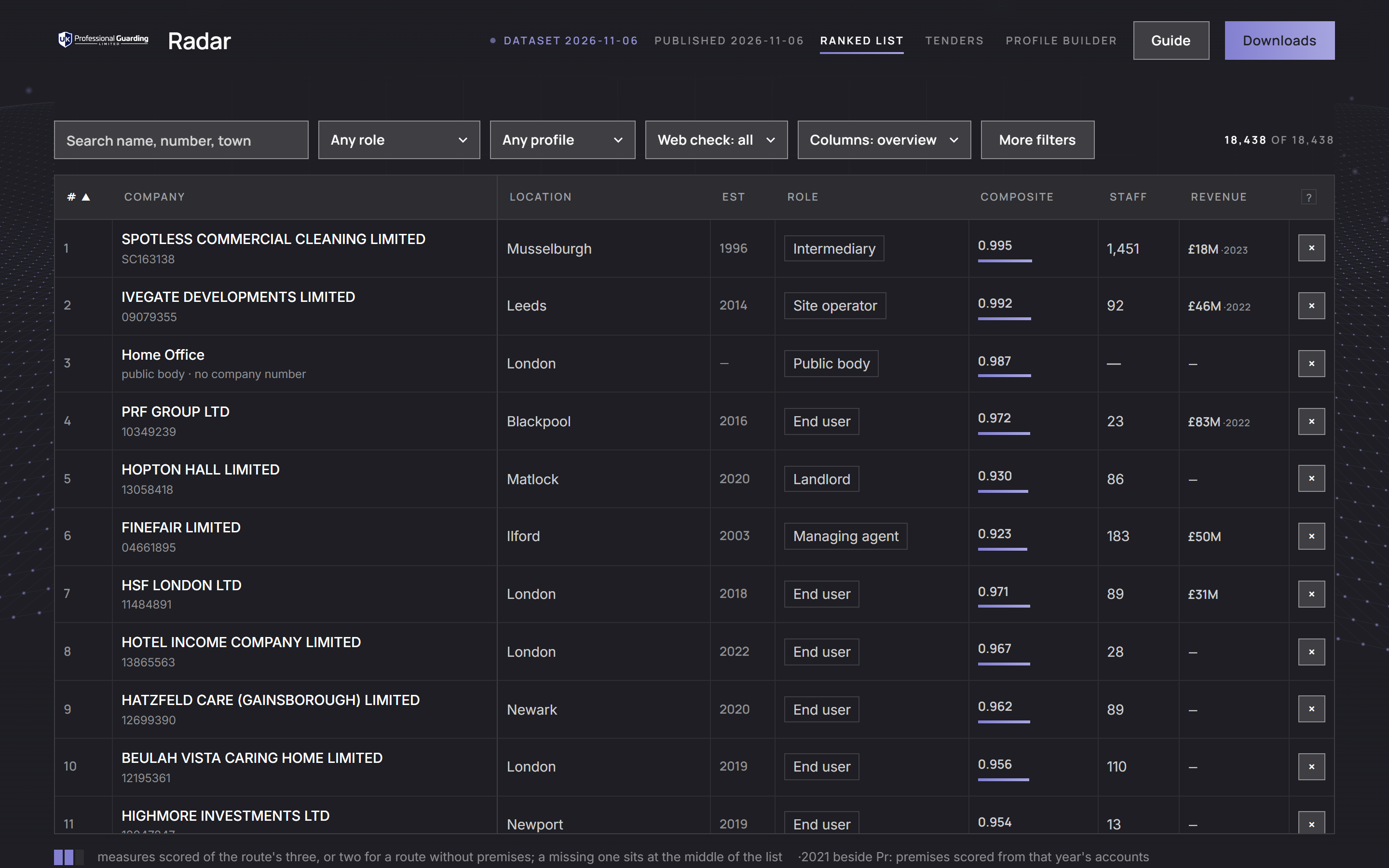
The Radar is three pages under one bar (Figure 2). The bar carries your mark and the word Radar and, on the ranked list, the dataset date ("Dataset 2026-11-06") and the date the pages were last published ("Published 2026-11-06"). Its menu names the three pages, with the current one underlined:
- Ranked list: the organisations in order, with the filters and the drawer (sections 5 and 6).
- Tenders: the public-sector market for guarding (section 7).
- Profile builder: count a population of your own choosing from the register (section 8).
On every page the bar also carries Guide, which opens this guide, and Downloads, which goes to the download links under the ranked list; the footer repeats the pages and the guide. The Tenders page's stamp ("Notices to") gives the date of the latest notice read. The wave behind the top of every page is decoration only.
4.1Links between the pages
- A route chip, in the table or the drawer, opens the list filtered to that route.
- On the Tenders page, a buyer, incumbent or winner that is a company on the list opens its drawer.
- In the drawer, a public body's notices link both to the notice at its source and to the buyer's own view on the Tenders page.
A link to something outside the Radar (a website, a notice or a search) opens in a new tab and sits beside the inside link, never in place of it. Each drawer and each filtered route has its own address, so you can bookmark it or send it to a colleague: for example #role=site_operator after the page's address opens the site operators.
4.2Phones
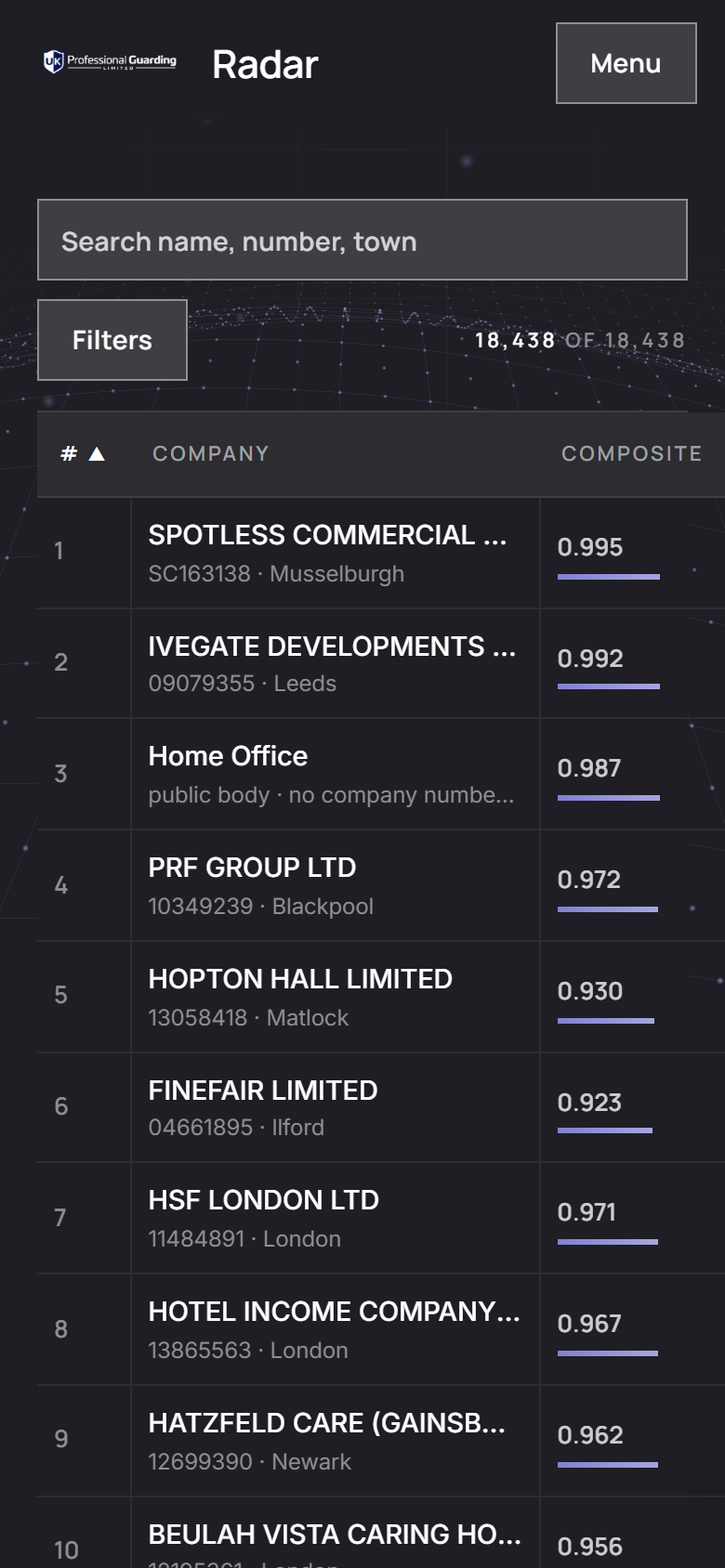
Under 800 pixels wide the bar becomes your mark and a Menu button, which opens the three pages, Guide, Downloads and the stamps as a sheet. On the ranked list the search box stays above the table and every other control sits behind a Filters button, which shows how many filters are active and opens them full height with "Show N companies" at the foot (Figure 3). The table becomes rank, company and composite, and scrolls with the page; everything else is in the drawer, which takes the full width.
The ranked list
5.1How the filters work
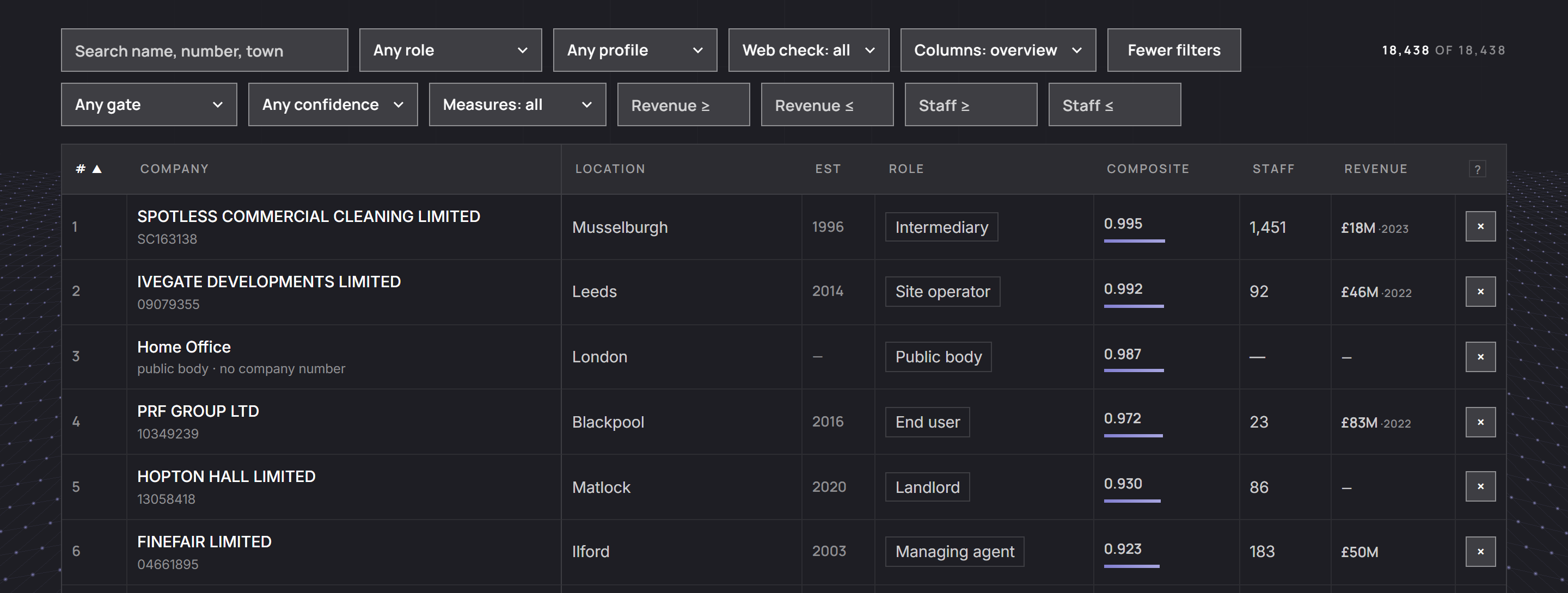
The filter row (Figure 4) holds the search box, Role, Profile, Web check, Columns and More filters, with the tally ("18,438 of 18,438") at the right. More filters opens a second row in place (the button then reads Fewer filters): Gate, Confidence, Measures, Relevance (once you have marked a row) and the revenue and staff bounds.
- Every filter you set applies at once with the others: an organisation must pass all of them.
- Each active filter appears as a chip under the row; click a chip to clear that filter alone, or Reset at the end of the chips to clear them all.
- Filters only hide rows. The # column keeps each organisation's published position.
- The page opens on the whole list. Reset returns to it and puts the table back in rank order.
- A filter whose column is empty in every row is not shown; a Public buyer filter appears once a company on the list is also found buying guarding on the notice platforms.
5.2Search
Type part of a company name, a company number or a town. Matching ignores case and works on any part of the text.
5.3Role, Profile and Web check
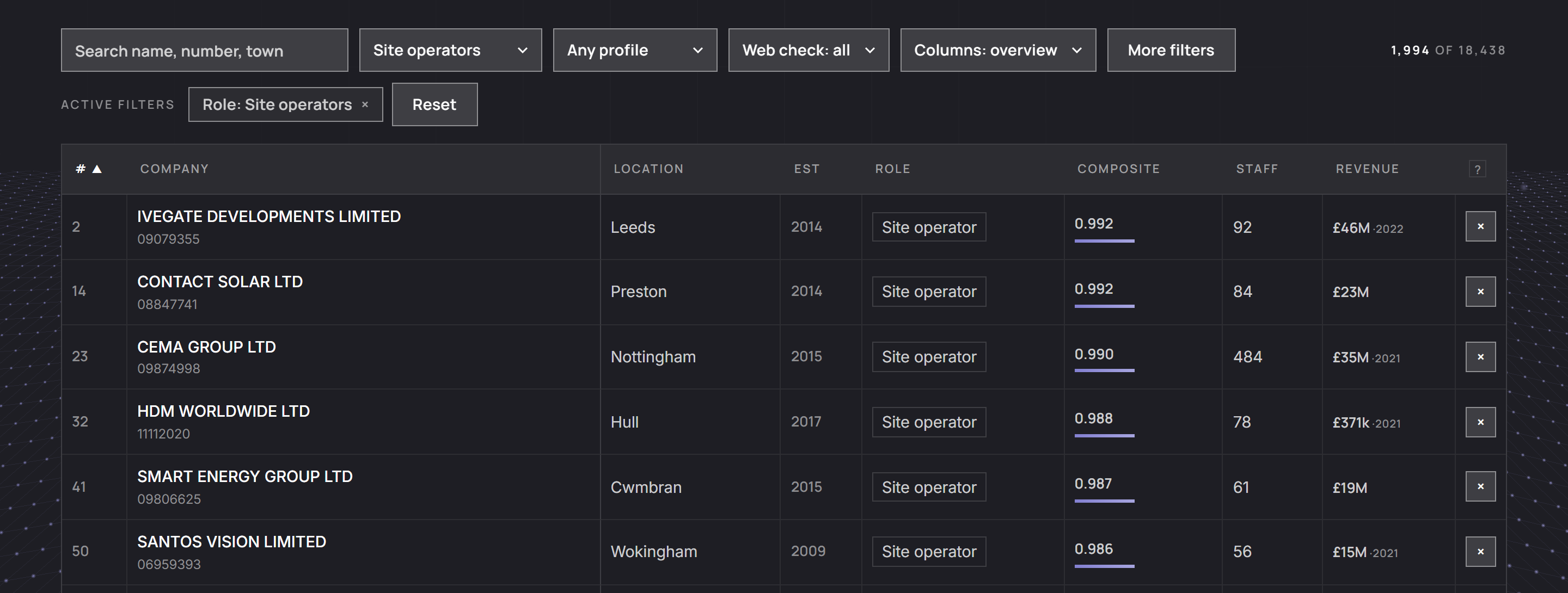
- Role: End users, Site operators, Managing agents, Landlords, Intermediaries or Public bodies (section 3.3; Figure 5).
- Profile: established, emerging, low headcount, headcount or public body.
- Web check: all; In scope; Adjacent; Out; No presence; Unchecked. "Unchecked" means no settled verdict yet.
5.4More filters
- Gate: staff and history, capital, headcount or tender buyer.
- Confidence: high, medium or low. It never changes the order. Site operators, intermediaries and managing agents never read high (section 3.6), so high shows none of them.
- Measures: "All three scored", or a single measure ("Premises scored", "Growth scored", "Signal scored").
- Revenue ≥ and Revenue ≤ take amounts such as 500k, 2.5M or 1,200,000 and test the latest turnover on file. A company with no turnover on file drops out while either bound is set, and most small companies file none.
- Staff ≥ and Staff ≤ work the same way on the latest headcount on file.
- Relevance: your own review marks (section 5.7).
5.5The columns
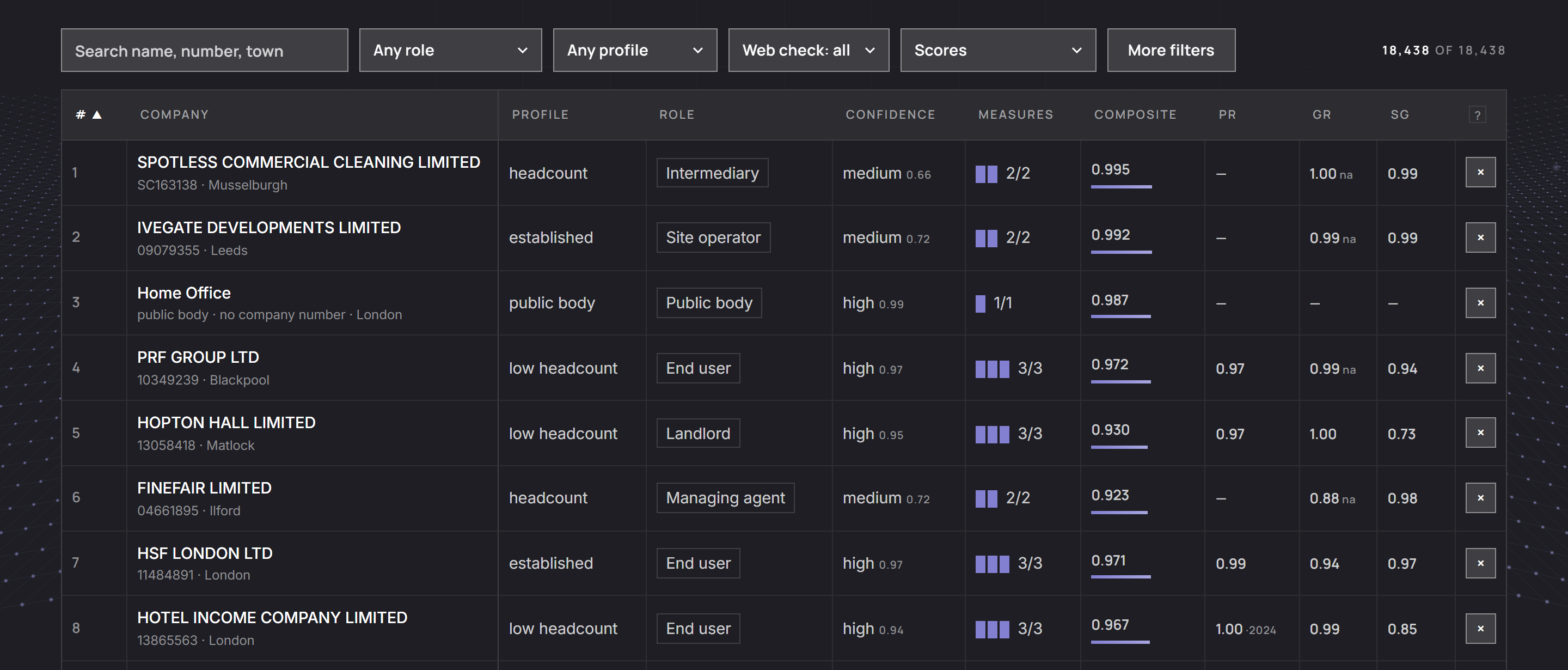
The Columns select chooses which columns the table shows: Overview (the default, which fits a 1,440 pixel window with the drawer closed), Scores, Financials or All columns (Figure 6). #, Company and the review mark are in every set, and # and Company stay in place while a wide table scrolls sideways. Your choice is remembered in your browser.
| Column | What it shows | Sets |
|---|---|---|
| # | the published position | all |
| Company | registered name with the company number beneath ("public body · no company number" where there is none); hover for a one-line description where one exists | all |
| Location | post town | Overview |
| Est | year of incorporation | Overview, Financials |
| Profile | how it came in | Scores |
| Role | its route, as a chip that opens the list filtered to it | Overview, Scores |
| Confidence | the band and the score | Scores |
| Measures | one cell for each of its route's measures, filled where scored, and the count | Scores |
| Composite | the composite to three places, with a bar beneath it | Overview, Scores |
| Pr | premises percentile, with the year where it was scored from older accounts | Scores |
| Gr | growth percentile; "na" means growth from net assets | Scores |
| Sg | signal percentile | Scores |
| Staff | latest headcount on file | Overview, Financials |
| Revenue | latest turnover on file, with its year where older than the accounts the scores use | Overview, Financials |
| Rev/head | turnover over average staff from one filing | Financials |
| ROCE | operating profit over capital employed from one filing; beyond ±1,000% a dash | Financials |
| × | your review mark | all |
A dash means no figure is on file. Under the table, a key repeats the conventions.
5.6Sorting
Click a column heading to sort the current view by it (#, Est, Composite, Pr, Gr, Sg, Staff, Revenue, Rev/head and ROCE). The first click sorts from highest to lowest (newest first for Est); # sorts from 1 upward. Click again to reverse. Companies with no figure go to the bottom in either direction. Sorting changes only what you see: the # column still shows each organisation's position in the ranked list.
5.7Review marks and the Relevance filter
- Click × at the end of a row to mark the organisation not relevant. The row fades; the mark becomes ↩, which restores it.
- The Relevance filter then hides marked rows or shows only them.
Review marks are stored in your browser only. They are keyed by company number, so they survive every re-export and re-rank, but they do not reach anyone else's screen or the downloads, and clearing your browser's stored data removes them.
5.8Below the table
- Downloads: Excel (the whole published list in three sheets), CSV (the same list in one file) and the JSON dataset the page loads. Downloads are always the whole list: your filters, sort order and review marks do not carry into them.
- Methodology (eyebrow "Read this first"): the counts of companies picked, public bodies, companies scored and organisations ranked, then the flow of Figure 1.
- Interpretation (eyebrow "Read this second"): the routes and their gates, then six notes on sources, signal, ranking against distance, missing measures, older-year premises and blank revenue.
5.9Keyboard and mouse
- Click a row, or move to it with the Tab key and press Enter, to open its drawer. Escape closes the drawer, as do Close and a click on the dimmed page.
- Hover a heading for its definition, a company name for its one-line description, the Measures cells for which measures were scored and a point on a drawer chart for its year and value.
A company in detail: the drawer
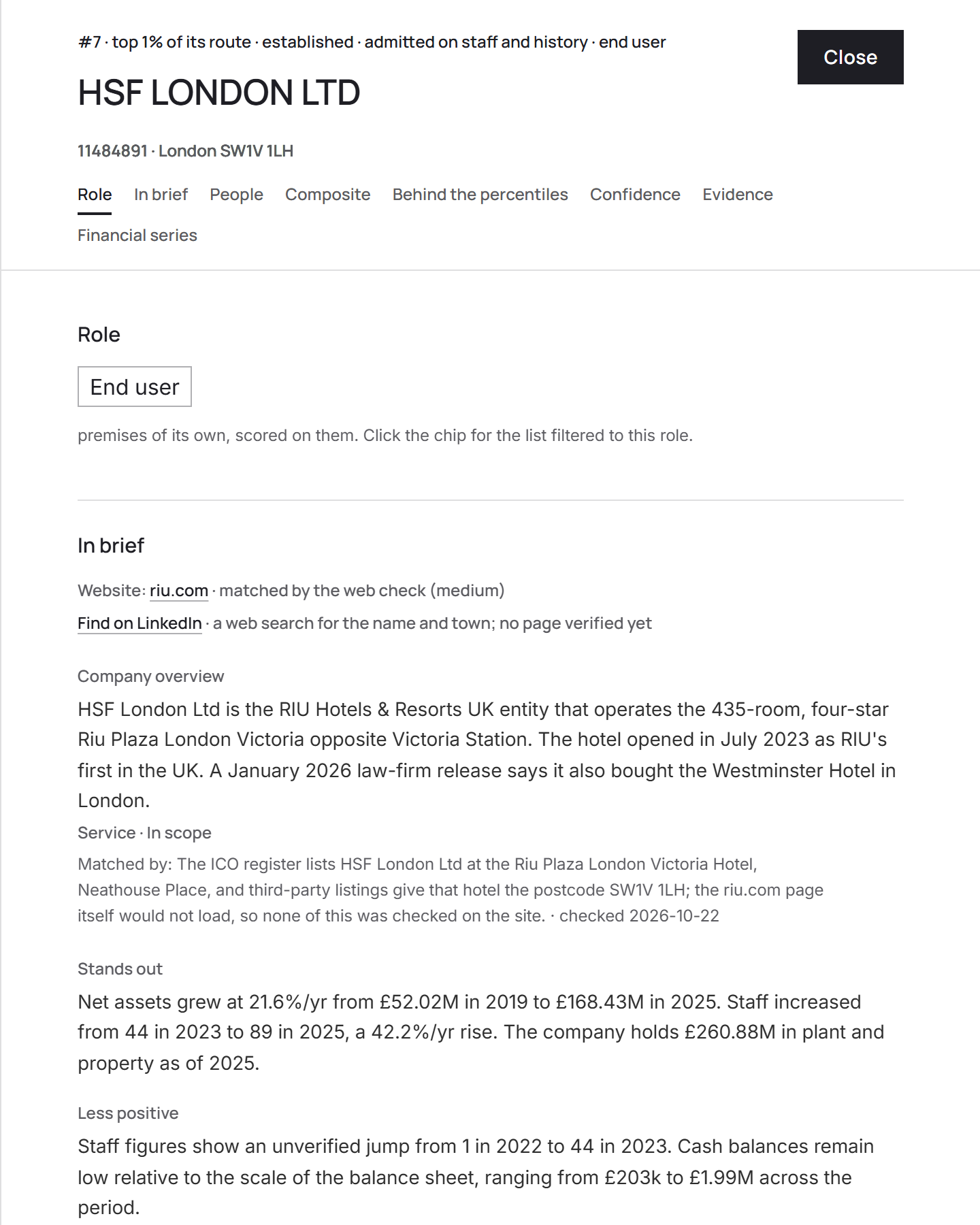
The drawer slides in from the right, up to 720 pixels wide. Its header stays in place as you scroll: the position and where the company sits in its route, the profile, the gate and the route ("#7 · top 1% of its route · established · admitted on staff and history · end user"), the name, then the company number, town and postcode. Under the header a jump row names each section the company has; click one to go to it. Sections appear only when there is something to show (Figure 7).
6.1Role and In brief
- Role: the route as a chip, which opens the list filtered to it, with one line on what the route means.
- Website: the site the Web check matched, as a link, and how sure the match was; or "Find their website", a web search for the name and town.
- LinkedIn: "Find on LinkedIn", a web search for the name and town.
- Company overview (from the Web check): what the organisation does, its category and relevance, quoted phrases from the site and "Matched by" with the evidence and the date checked.
- The summary: "Stands out", "Less positive" and "Uncertain", with the note naming who wrote them.
- Companies House: status, year of incorporation, activity codes, "Selected because", accounts type and the date of the latest accounts, charges where there are any, "Gate inputs on file" and, where it applies, "Capital limb read".
6.2People
The Directors, each with the year appointed and a link to a UK Google search, or "No active director on the officers file."
6.3The scores
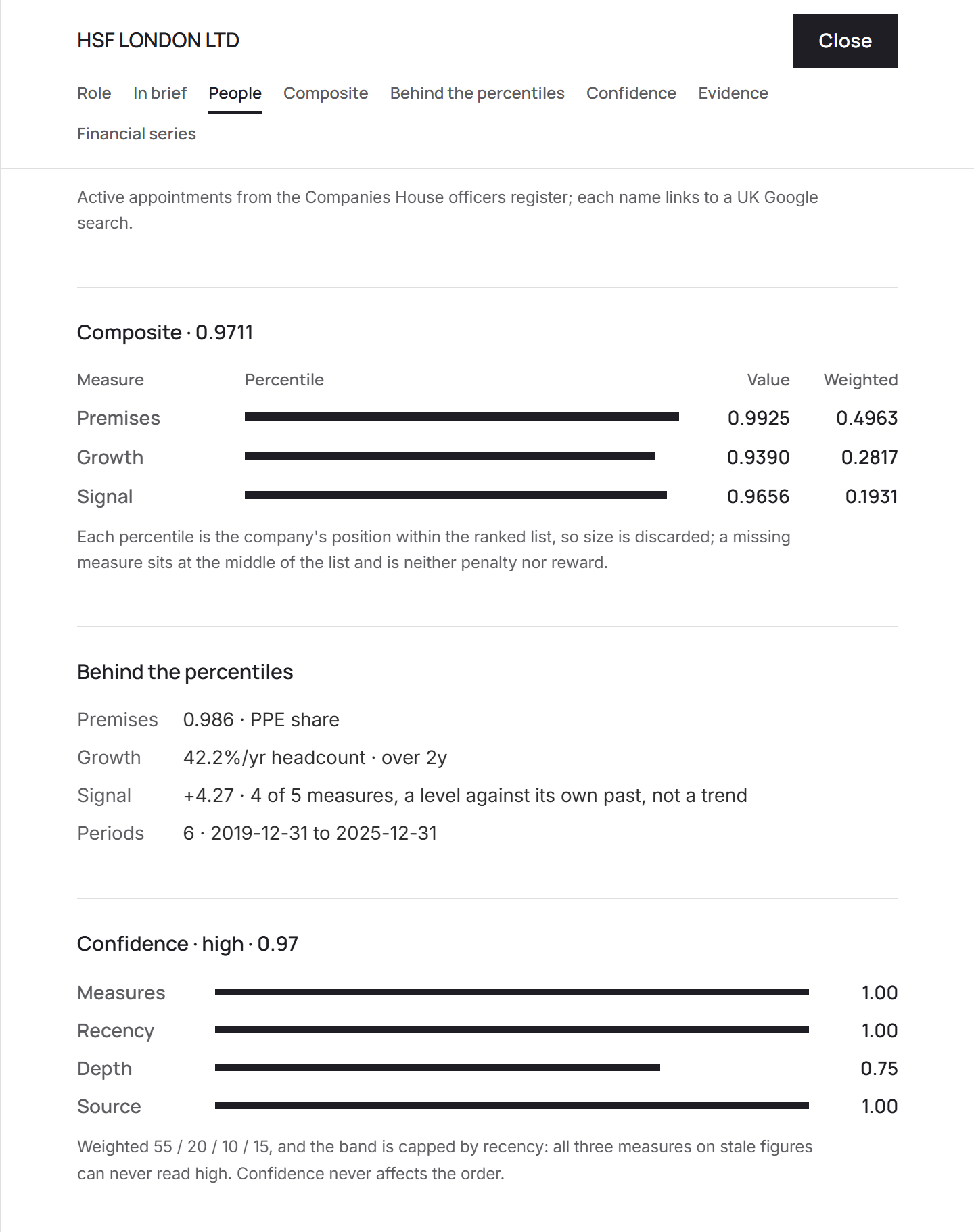
- Composite: one line per measure the route is scored on: a bar as long as its percentile, the percentile ("Value") and its contribution ("Weighted"), adding up to the composite in the heading. For a site operator, intermediary or managing agent a note under it gives the route's renormalised weights; for an end user or landlord it repeats that a missing measure sits at the middle.
- Behind the percentiles: the premises value and its basis (or "not scored" and why); "Premises year" where the score came from older accounts; growth as a rate a year on headcount or net assets, with the years it was measured over; signal with the number of the five figures it used; and the span of accounts.
- Confidence: the band and score, then the four parts with a bar each and the note that confidence never affects the order (Figure 8).
- Evidence: no outside markers are loaded for this list yet, so it reads "No marker on file; ranked from its own accounts alone."
- Financial series: small charts for staff, net assets, stocks and tangible assets where at least three years exist (hover a point for its year and value), and a table of every year on file: staff, net assets, current assets, cash, stocks, tangible assets (the figure premises is scored from), turnover and source.
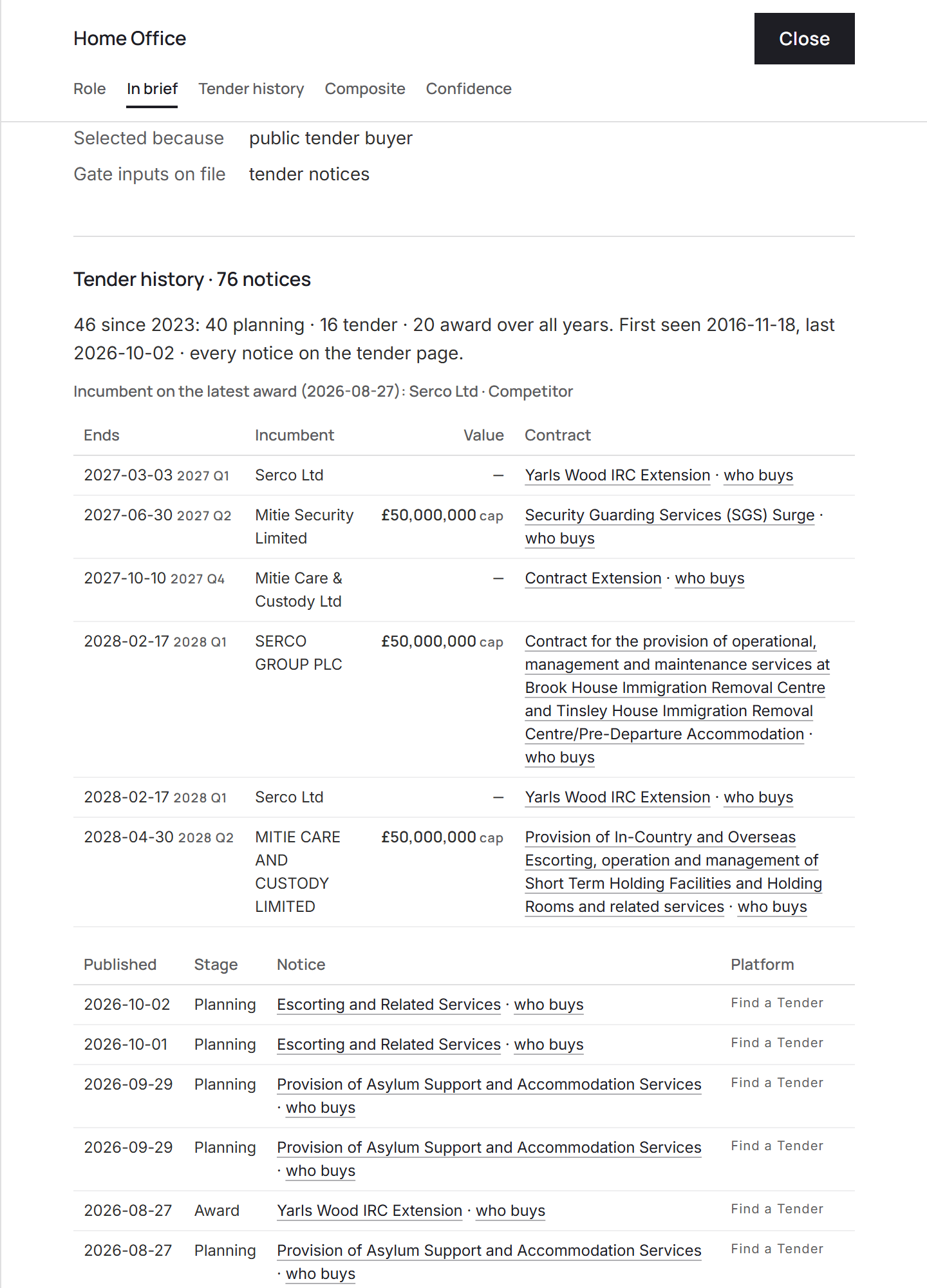
6.4A public body's drawer
A public body's drawer (Figure 9) has no accounts measures. In their place:
- Tender history: its notices since the start of the window and over all years by stage (planning, tender, award, contract), when it was first and last seen, the incumbent on its latest award, every contract of its ending within the horizon (end date, incumbent and value) and its newest notices, each linking to the notice at its source and to the buyer's view on the Tenders page.
- Composite: its one measure, market activity, with the note on how it is made (section 3.7).
- Confidence: read for a public body as section 3.6 describes.
Tenders
The Tenders page shows what the public sector buys of guarding: notices for security services, guard services and patrol services. Its notices come from Find a Tender (every above-threshold notice since 2021, and everything procured under the Procurement Act 2023 since it came into force on 24 February 2025) and Contracts Finder (procurements begun before then). Together they cover England, Wales and Northern Ireland; Scotland publishes on Public Contracts Scotland, which is not covered, so the Scottish notices shown are those that also reached Find a Tender. The market shown is the UK's: a notice for a British post abroad (an embassy, a high commission, a consulate, an overseas mission, or any notice whose delivery address is outside the UK) is left out, so the Foreign, Commonwealth and Development Office's guarding of its missions overseas, the largest run of guarding notices on the platforms, does not appear here or count towards its place on the ranked list.
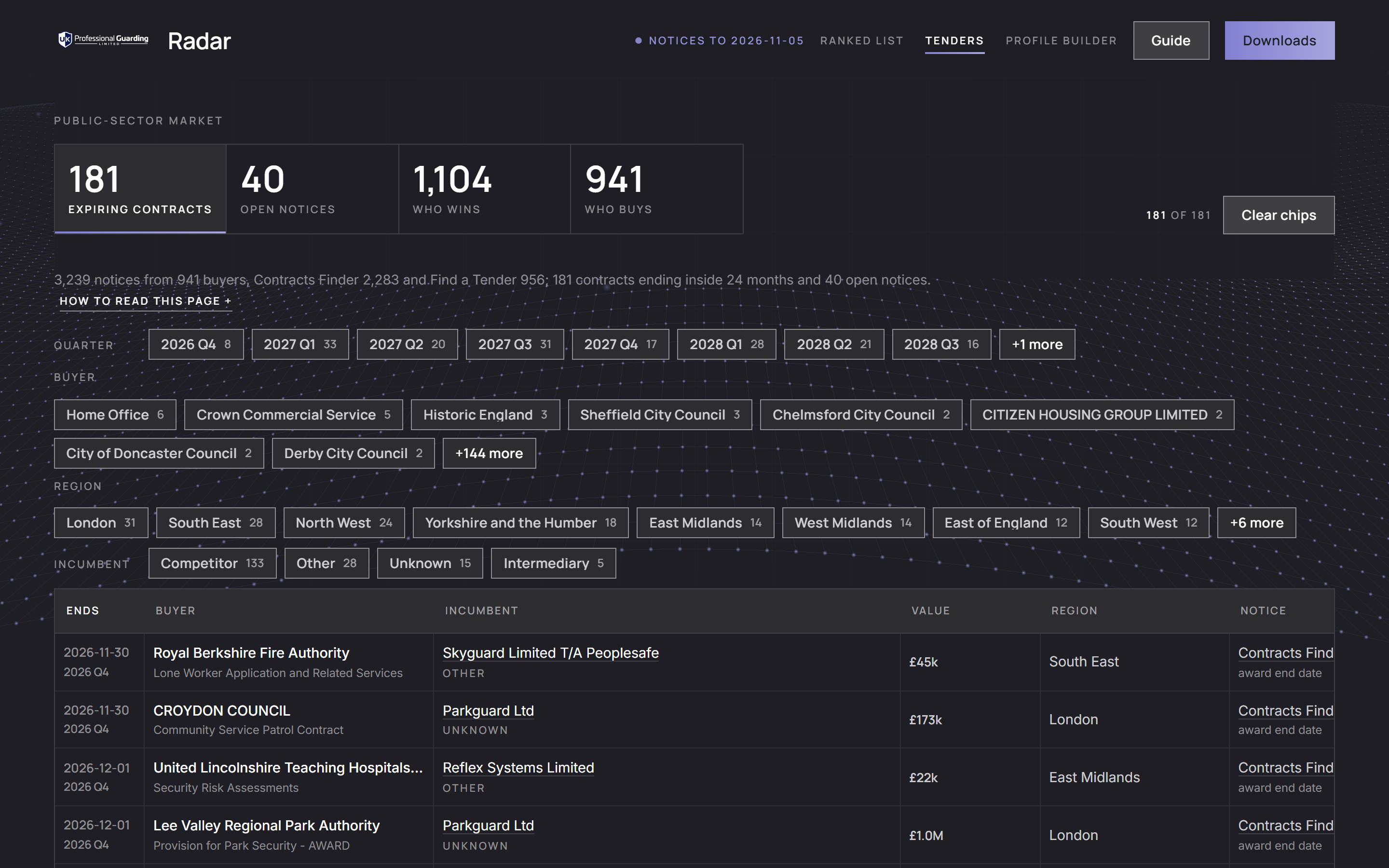
Four tiles at the top switch the view and show its count (Figure 10):
| View | What it lists | Chips |
|---|---|---|
| Expiring contracts | every contract ending within 24 months, soonest first, with its buyer, incumbent and value | Quarter, Buyer, Region, Incumbent |
| Open notices | planning and tender notices with no award yet, closing within 90 days (or with no deadline and published in the last 90), with the days left | Stage, Buyer, Region |
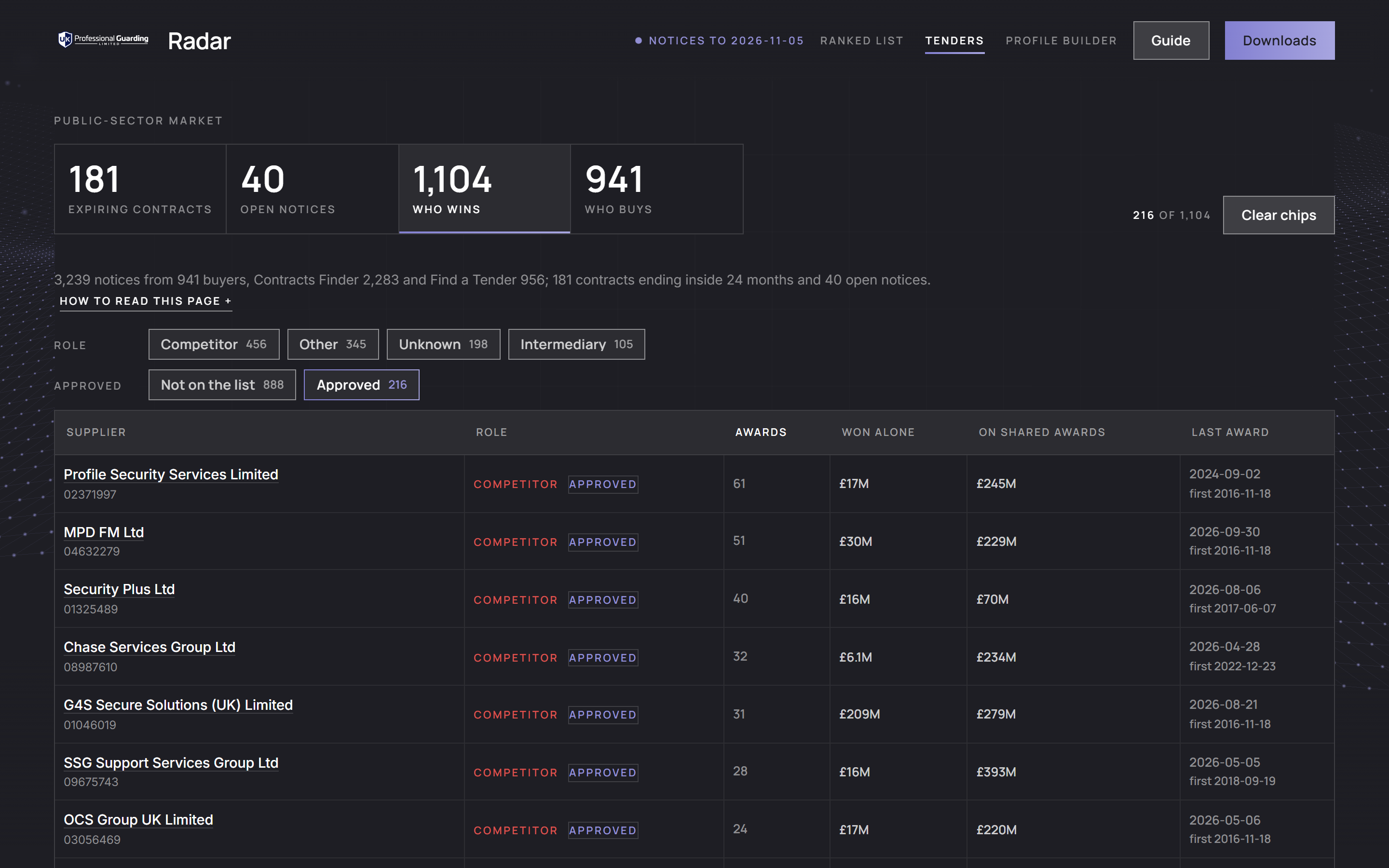
| Who wins | every supplier that has won the work: its awards, the value it won alone, the value of its shared awards and its last award; click a row for the buyers it won from | Role, Approved |
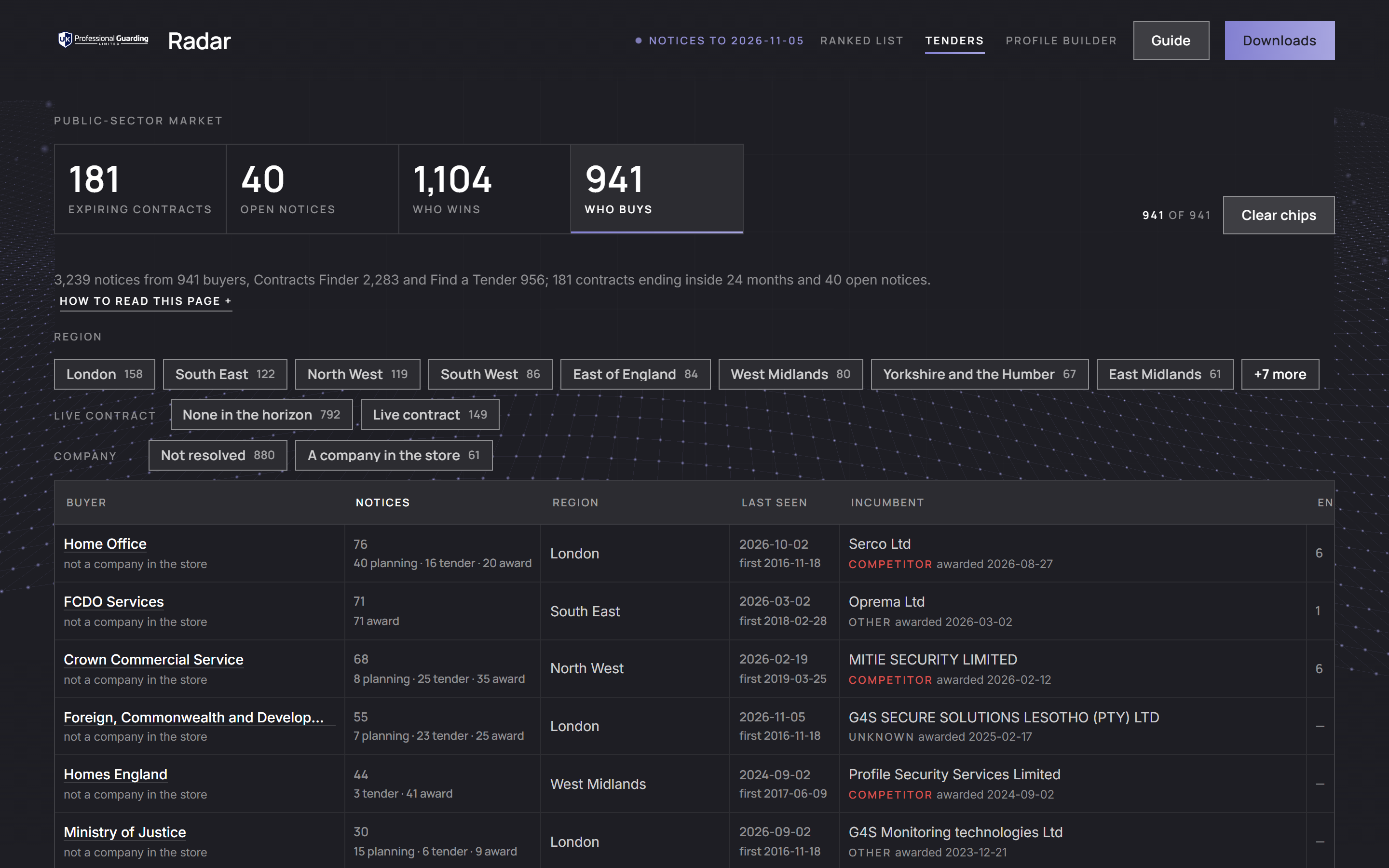
| Who buys | every buyer, with its notices by stage, its region, when it was first and last seen, the incumbent on its latest award and its contracts ending in the horizon | Region, Live contract, Company |
7.1Reading the views
- Values are as published. A value above £50M is shown at £50M with the published figure beside it ("cap · published £…"), because a framework publishes its whole ceiling, which is not one contract's worth; sums and sorting use the capped figure.
- End dates are the one the notice states, or the term on the tender notice of the same procurement where the award states none; an award that states no term anywhere cannot appear under Expiring contracts. A contract published on both platforms appears once for each.
- A supplier's role is a hint: competitor, intermediary, other or unknown, from its registered activity code first and the words in its name second. A supplier on the SIA's Register of Approved Contractors (as published on 17 September 2026) is a competitor ahead of those rules and carries the Approved chip (Figure 11).
- A buyer is one spelling of a name under Who buys: a department that changed its name, or writes it two ways, is two rows. A buyer's chip on the other views covers every spelling, and a buyer's name under Who buys opens its own view, every spelling of its name included (Figure 12).
- The viewer's day. The views are built on the export day. A contract that has ended, or a notice whose deadline has passed, since then is left out on the day you read the page, and the first sentence says how many.
- Click a column heading to sort. A company with a number opens its drawer on the ranked list; a notice opens at its source in a new tab. A table wider than the window scrolls sideways inside its own box. Clear chips resets the chips.
Why it mattersThe Tenders page says who buys guarding, who holds the work now and when it comes up again.
The profile builder
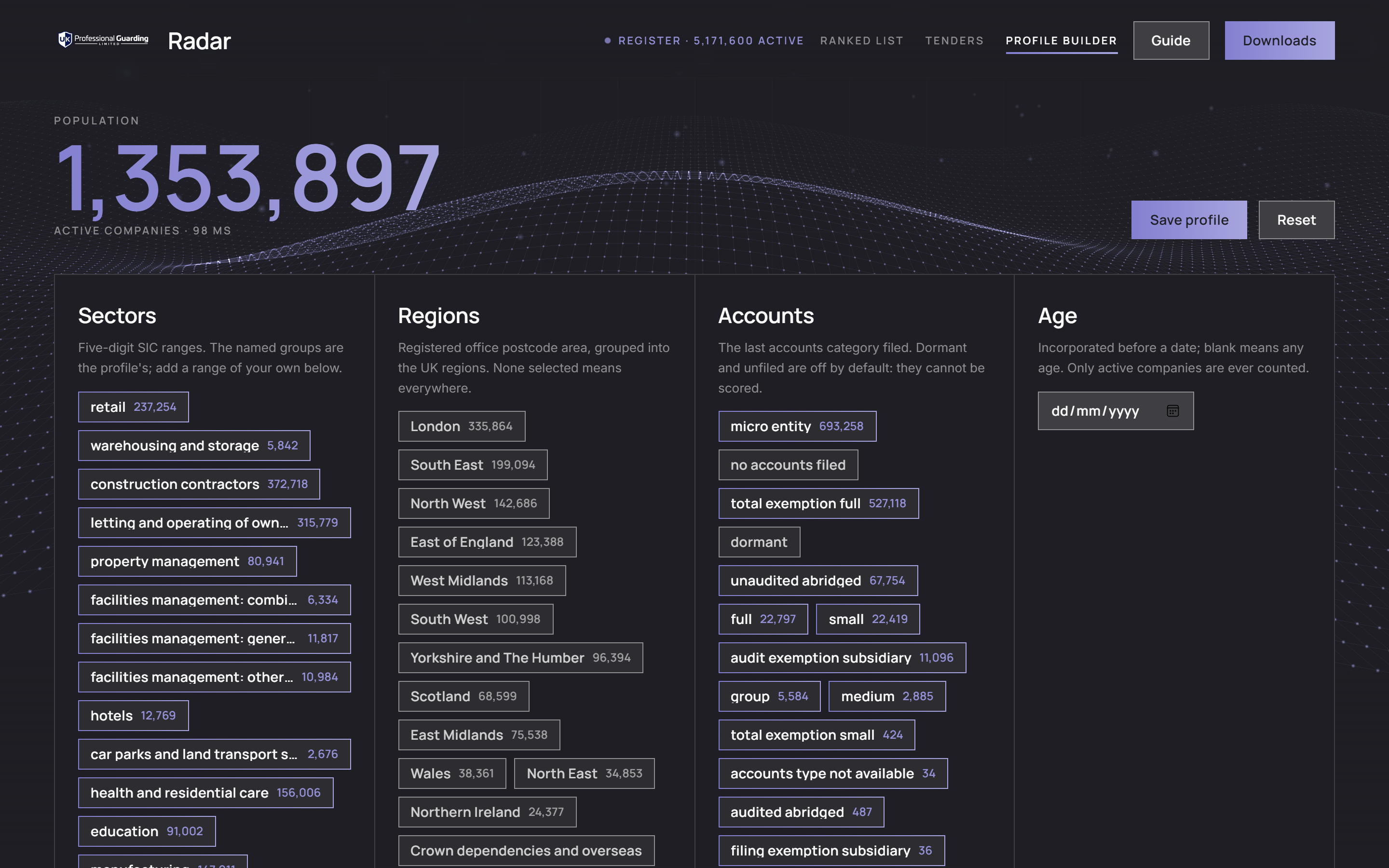
The profile builder counts a population from the register as you choose it, live, before any list is built (Figure 13). It is how you ask for a Radar of a different shape: another sector, region or size of company.
- Sectors: the named groups of section 3.1 as chips, all on to start, each showing its count; click one to leave it out, or add a range of your own (two five-digit activity codes and a label). Reject codes: a company carrying any of these is out, whatever else it carries (private security, to start).
- Regions: the registered office's postcode area, grouped into the UK regions. None selected means everywhere.
- Accounts: the latest accounts category filed. Dormant and unfiled are off by default: they cannot be scored.
- Age: incorporated before a date; blank means any age.
- The count at the top updates as you choose, with the population by sector, by region and by accounts beneath. A company with codes in two selected sectors is counted once in the total and once under each sector, so the sector figures can add up to more than the total. Only active companies are ever counted.
- Save profile downloads the selection as a file. Send it to Zirstar to have a list built for that population: its companies are then read from their accounts, routed, gated and ranked as section 3 describes. Reset returns to the list's own selection: every sector on, private security rejected, every region, the default accounts and any age.
- The bar's stamp gives the number of active companies in the register the count is taken from ("Register · N active").
Why it mattersThe count tells you how large a population is before any time is spent on it; the ranked list then decides which of it to call first.
What the Radar cannot tell you
- How much better one organisation is than another. Percentiles keep the order and discard distance (section 3.5).
- How the routes compare. The order is by each organisation's place within its route; an end user and a site operator side by side are each the best of their kind, not measured against each other.
- Anything about a measure it could not score. A missing measure sits at the middle, so a company scored on one measure tops out at 0.75 on the three-measure routes (end users and landlords) and at 0.80 on growth alone (0.70 on signal alone) for a site operator, intermediary or managing agent.
- Whether a company actually buys guarding. Premises reads the shape of the balance sheet. A company with plenty of plant and property may guard it in-house, need no guarding or already hold a long contract; the Web check and the Tenders page help, a conversation decides.
- Direction. Signal is a level against the company's own past, not a trend.
- Revenue for most companies. Most small companies file accounts without a profit and loss account, so no turnover is on file.
- Group performance. Group accounts describe a family of companies and are never scored.
- Current directors. Directors are as at the last fetch of the officers register.
- A settled view of every website. 6,079 organisations have no verdict; verdicts are a model's reading of a website on a date, and a site can be out of date or wrong.
- Guarding of British posts abroad. Notices for embassies, high commissions, consulates and other overseas missions are left out of the Tenders page and of the public-body route; they are read, counted (319 on the export day) and set aside.
- Private buyers' contracts. The Tenders page sees only public notices. What a retailer, a landlord or a manufacturer pays for guarding, and when its contract ends, is not published anywhere the Radar reads.
- Contracts in Scotland. Public Contracts Scotland is not read.
- Every competitor. A supplier's role is a hint from its activity code and its name; only the SIA's approved list is used to name competitors outright.
- The meaning of a model summary, guaranteed. The check covers numbers, not wording.
- What your colleagues marked. Review marks stay in each person's browser.
- A filtered download. The downloads are always the whole list.
Glossary
- Adjacent: a Web check verdict for a head office, a property investor whose buildings are run by others or a contractor that buys guarding for its clients' premises or its sites.
- Band: high, medium or low confidence.
- Borrowed year: the older year a premises score was taken from, shown as "·2021" beside the figure.
- Capital limb: the way in on plant and property: £2M for an end user, £10M for a landlord, each with at least 10 staff.
- Composite: the weighted sum of a company's percentiles; it breaks ties within a route.
- Confidence: how much stands behind a company's scores; never affects the order.
- Consolidated: group accounts covering a family of companies; kept as evidence, never scored.
- Drawer: the panel that opens when you click a row.
- Emerging: in on plant and property with fewer than three years of accounts.
- End user: an organisation with premises of its own, scored on them.
- Established: in on three years of accounts and the route's staff bar.
- Filleted accounts: small-company accounts filed without a profit and loss account, so without turnover.
- Headcount: in on staff alone (intermediaries and managing agents, at 100).
- In scope: a Web check verdict for an organisation with premises or sites that would be guarded.
- Incumbent: the supplier on a contract's latest award.
- Intermediary: a facilities contractor, whose premises are its clients'.
- iXBRL: tagged accounts that a machine can read exactly.
- Landlord: a company whose every code is in property letting or dealing, in on £10M of plant and property.
- Low headcount: in on plant and property with three or more years of accounts but under the staff bar.
- Managing agent: a company that runs buildings for others on a fee.
- Market activity: a public body's composite: its notices, a contract ending soon and how lately it was seen.
- Overseas post: a British embassy, high commission, consulate or mission abroad; its notices are left out of the Tenders page and the public-body route.
- Percentile: the share of the ranked list a company beats on one measure, from 0 to 1.
- Premises: plant and property as a share of everything the company owns.
- Public body: a buyer of guarding on the public notice platforms, ranked on its tender activity.
- Review mark: your own "not relevant" mark on a row, kept in your browser alone.
- Route: one of the six ways onto the list, each with its own gate and measures.
- Signal: the latest year against the company's own median; a level, not a trend.
- Site operator: a construction contractor, whose premises are its sites.
- Stale summary: a model summary drafted before the company's figures last changed, shown with its draft date.
- Unchecked: no settled Web check verdict yet.
- Web check: a model's reading of each organisation's own website, with the evidence kept; display and filter only.